
I am trying to create an HTML table that reads in Excel file. At the rightmost column, is a checkbox column where we can select the rows we want. The user opens the file, and then reads it to a table.
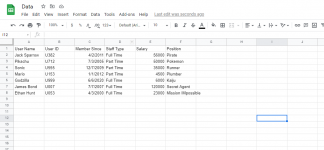
Here is my excel file below:
What I expected:
What I actually got:
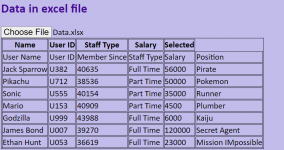
As you can see, upon opening the file, the code read EVERY SINGLE ROW AND COLUMN, which is not what I want. I want it to read specific columns, and the first header in the excel file ignored. How can I rewrite my code?
Thanks and hope to hear from you soon.
Code:
<body>
        <h2>Data in excel file</h2>
        <input type="file" id="input">
        <table id="tdata">
            <thead>
                <tr>
                    <th>Name</th>
                    <th>User ID</th>
                    <th>Staff Type</th>
                    <th>Salary</th>
                    <th>Selected</th>
                </tr>
                <script>
                    var input=document.getElementById('input');
                input.addEventListener('change', function() {
                    readXlsxFile(input.files[0]).then(function(data) {
                        var i=1;
                        data.map((row,index)=>
                        {
                                let table=document.getElementById('tdata');
                                generateTableRows(table,row);
                        });
                    });
                });

                function generateTableHead(table,data)
                {
                    let thead=table.createTHead();
                    let row=thead.insertRow();
                    for(let key of data) {
                        let th=document.createElement('th');
                        let text=document.createTextNode(key);
                        th.appendChild(text);
                        row.appendChild(th);
                    }
                }

                function generateTableRows(table,data)
                {
                    let newRow=table.insertRow(-1);
                    data.map((row,index)=>{
                        let newCell=newRow.insertCell();
                        let newText=document.createTextNode(row);
                        newCell.appendChild(newText);
                    });
                }
                </script>
            </thead>
        </table>
    </body>
Here is my excel file below:
What I expected:
| Name | User ID | Staff Type | Salary | Selected |
| Jack Sparrow | U382 | Full Time | 56000 | Pirate |
| ... | ... | ... | ... | ... |
What I actually got:
As you can see, upon opening the file, the code read EVERY SINGLE ROW AND COLUMN, which is not what I want. I want it to read specific columns, and the first header in the excel file ignored. How can I rewrite my code?
Thanks and hope to hear from you soon.

