
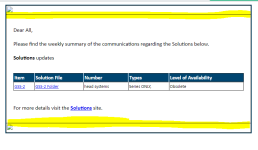
Hello, I am facing issues in removing a thin line right after the header and right before the footer. Please can you help me with this?
I have pasted the entire code.
You can also try placing the same code here: https://www.w3schools.com/html/tryit.asp?filename=tryhtml_formatting_intro
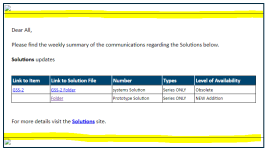
If I change the table td, table th as below
Even table line gets removed.
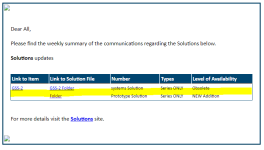
The entire code is below
I have pasted the entire code.
You can also try placing the same code here: https://www.w3schools.com/html/tryit.asp?filename=tryhtml_formatting_intro
If I change the table td, table th as below
Code:
table td, table th {
  border: 0px solid #000000;
  padding: 3px 2px;
}
Even table line gets removed.
The entire code is below
Code:
<!DOCTYPE html>
<html lang="en">
<head>
    <meta charset="UTF-8">
    <meta name="viewport" content="width=device-width, initial-scale=1.0">
    <style>
        body {
            background-color: #FFFFFF;
            font-family: Calibri;
            text-align: center;
        }

        #content {
            border: 2px solid #003B5C;
            background-color: #ffffff;
            width: 705px;
            margin: 0;
            display: inline-block;
        }

        #logo {
            margin: auto;
            width: 200px;
            height: 50px;
        }

        #header {
            font-size: 24px;
            margin: auto;
        }

        #ribbon {
            background-color: #003B5C;
        }

        #ribbonContent {
            font-size: 20px;
            padding-left: 30px;
            padding-top: 10px;
            padding-bottom: 20px;
            color: white;
            width: 100%;
            padding-right: 10px;
        }

        #message>td {
            font-size: 14px;
            padding-left: 20px;
            padding-right: 20px;
            padding-top: 20px;
            padding-bottom: 20px;
        }

        #footer>td {
            font-size: 12px;
            background-color: #cfcfcf;
            height: 40px;
            padding-top: 15px;
            padding-left: 40px;
            padding-bottom: 20px;
        }

        #form {
            width: 100%;
            border-collapse: collapse;
        }

        #app {
            width: 60%;
            font-size: 12px;
        }

        .label {
            color: #5f5f5f;
        }

        table {
            border-collapse: collapse;
            width: 100%;
        }

        th, td {
            padding: 8px;
            text-align: left;
            border-bottom: 1px solid #FFFFFF;
        }
    </style>
</head>
<body>
    <div id='content'>
        <table id='form'>
            <tr>
                <td>
                    <img src='https://demo.tutorialzine.com/2015/02/freebie-7-responsive-header-templates/' width='100%'>
                </td>
            </tr>
            <tr id='message'>
                <td>
<!-------------------------- Your message content here ------------------------------------->


<p><span style="font-size: 16px">Dear All,<br>
<br>
Please find the weekly summary of the communications regarding the Solutions below.<br>
<br>
</span><span style="font-size: 16px"><strong>Solutions</strong></span><span style="font-size: 16px"> updates<br>
<br>
</span><span style="font-size: 16px"><style>
table {
  border: 1px solid #004570;
  background-color: #FFFFFF;
  width: 100%;
  text-align: left;
  border-collapse: collapse;
}
table td, table th {
  border: 1px solid #000000;
  padding: 3px 2px;
}
table tbody td {
  font-size: 13px;
}
table thead {
  background: #004570;
  border-bottom: 2px solid #444444;
}
table thead th {
  font-size: 15px;
  font-weight: bold;
  color: #FFFFFF;
  border-left: 2px solid #D0E4F5;
}
table thead th:first-child {
  border-left: none;
}
</style>
<table><thead><tr><th>Link to Item</th><th>Link to Solution File</th><th>Number</th><th>Types</th><th>Level of Availability</th></tr></thead><tbody><tr><td><a href="https://">GSS-2</a></td><td><a href="https://">GSS-2 Folder</a></td><td>systems Solution</td><td>Series ONLY</td><td>Obsolete</td></tr><tr><td><a href="https://"></a></td><td><a href=""> Folder</a></td><td>Prototype Solution</td><td>Series ONLY</td><td>NEW Addition</td></tr></tbody></table></span><span style="font-size: 16px"><br>
<br>
For more details visit the </span><a href="https://"><span style="font-size: 16px"><u><strong>Solutions</strong></u></span></a><span style="font-size: 16px"> site.<br>
</span></p>


<!-------------------------- Your message content here ------------------------------------->
                </td>
            </tr>
            <tr>
                <td>
                    <img src='https://demo.tutorialzine.com/2015/02/freebie-7-responsive-header-templates/' width='100%'>
                </td>
            </tr>
        </table>
    </div>
</body>
</html>
Attachments
Last edited:

